2020-12-27
#4. 3 Adding Genres
이제 이어서 장르를 웹에 출력해내기 위해 코드를 작성한다.
import React from "react";
import PropTypes from "prop-types";
import "./movie.css"

function Movie({ year, title, summary, poster, genres}){
    return (
    <div className="movies__movie">
                    <img src={poster} alt={title} title={title}/>
        <div className="movie__data">
            <h3 className="movie__title">{title}</h3>
        <h5 className="moive__year">{year}</h5>
        //요기    <ul className="genres">{genres.map((genre,index) => <li className="genres__genre">{genre}{index}</li>)}</ul>
        <p className="movie__summary">{summary}</p>

    </div>
    </div>
    );
}
Movie.propTypes = {
    id: PropTypes.number.isRequired,
    year: PropTypes.number.isRequired,
    title: PropTypes.string.isRequired,
    summary: PropTypes.string.isRequired,
    poster: PropTypes.string.isRequired,
    genres: PropTypes.arrayOf(PropTypes.string).isRequired //요기

};

export default Movie;
이렇게 작성하면 콘솔 오류가 발생할 것인데 전에 이야기했듯이 map에는 각각의 item들은 key가 필요하다.
그런데 장르에는 제공할 key가 없다 왜냐하면 장르에는 id라던지 그런 번호가 매겨져있지 않기 때문에 그래도 괜찮다.
map function은 argument를 전달해주는데 첫 번째는 item 우리가 아는 장르의 종류들이 나오고 두 번째는
item number이다. 그래서 index, or current item number 사용자맘대로 번호를 정할 수 있다.
genres.map(genre,??) => 이 부분에?? 를 사용자 정의해서 아무렇게나 붙여도 된다. 붙이고 {??}를 출력문에 추가하면 장르에 번호가 나오는 걸 확인 가능하다. 확인 후에는 <li> 안에 key값을 넣어주자

#4. 4 Styles Timeleapse
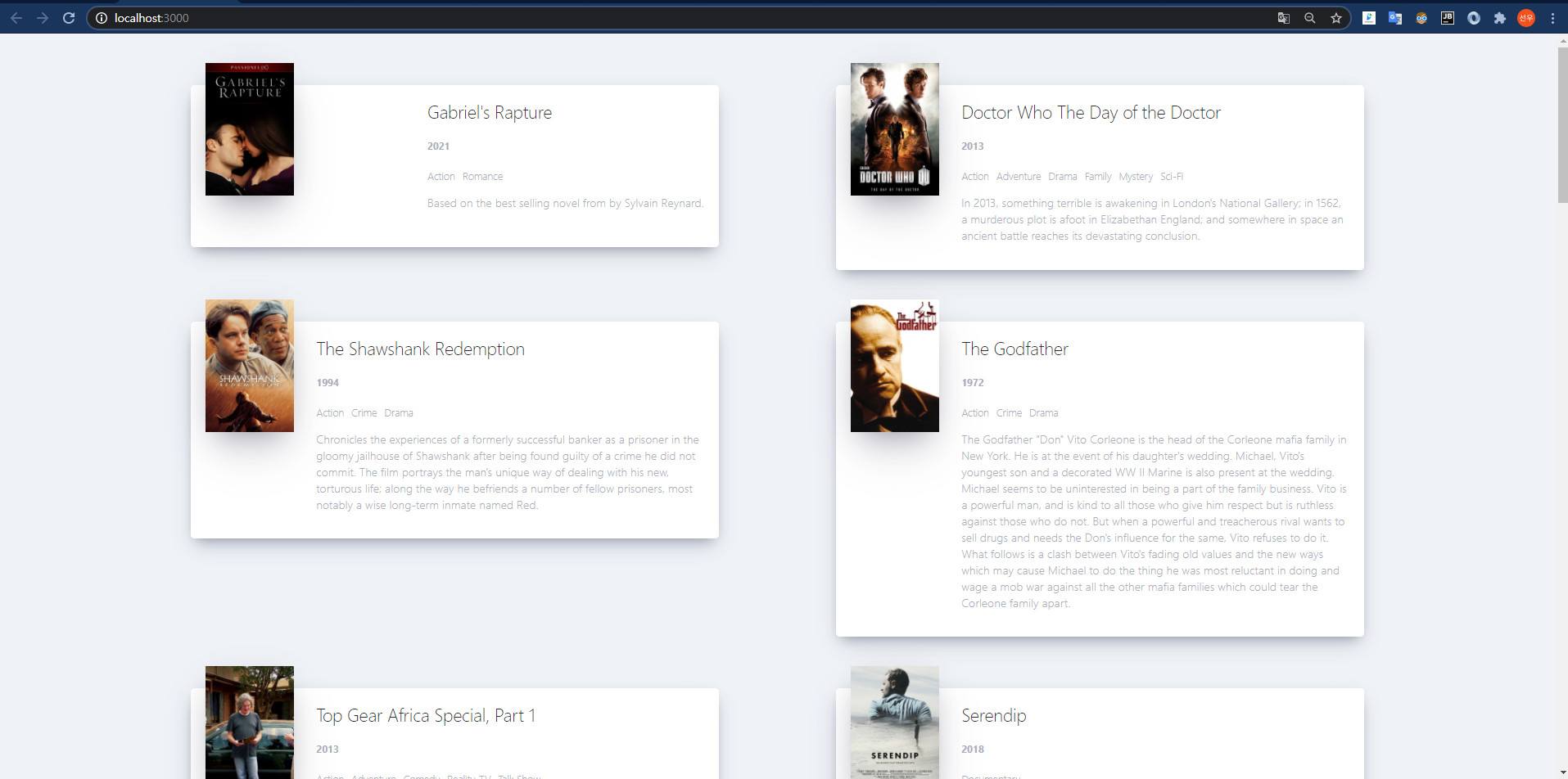
이 챕터는 스타일 같은걸 적용하는 걸 보고 따라 하는 거 같다 다른 부가설명은 없었다.
css를 아직 안 배워서 그냥 묻지 마 코딩식으로 따라 하기만 했다.
* {
    box-sizing: border-box;
}

body {
    margin: 0;
    padding: 0;
    font-family: -apple-system, BlinkMacSystemFont, "Segoe UI", Roboto, Oxygen,
    Ubuntu, Cantarell, "Open Sans", "Helvetica Neue", sans-serif;
    background-color: #eff3f7;
    height: 100%;
}

html,
body,
#root,
.container {
    height: 100%;
    display: flex;
    justify-content: center;
}

.loader {
    width: 100%;
    height: 100%;
    display: flex;
    justify-content: center;
    align-items: center;
}

.movies {
    display: flex;
    justify-content: space-between;
    align-items: flex-start;
    flex-wrap: wrap;
    padding: 50px;
    padding-top: 70px;
    width: 80%;
}

.movies .movie {
    width: 45%;
    background-color: white;
    margin-bottom: 70px;
    display: flex;
    align-items: flex-start;
    justify-content: space-between;
    font-weight: 300;
    padding: 20px;
    border-radius: 5px;
    color: #adaeb9;
    box-shadow: 0 13px 27px -5px rgba(50, 50, 93, 0.25),
    0 8px 16px -8px rgba(0, 0, 0, 0.3), 0 -6px 16px -6px rgba(0, 0, 0, 0.025);
}

.movie img {
    position: relative;
    top: -50px;
    max-width: 120px;
    margin-right: 30px;
    box-shadow: 0 30px 60px -12px rgba(50, 50, 93, 0.25),
    0 18px 36px -18px rgba(0, 0, 0, 0.3), 0 -12px 36px -8px rgba(0, 0, 0, 0.025);
}

.movie .movie__title,
.movie .movie__year {
    margin: 0;
    font-weight: 300;
}

.movie .movie__title {
    margin-bottom: 5px;
    font-size: 24px;
    color: #2c2c2c;
}

.movie .movie__genres {
    list-style: none;
    padding: 0;
    margin: 0;
    display: flex;
    margin: 5px 0px;
}

.movie__genres li,
.movie .movie__year {
    margin-right: 10px;
    font-size: 14px;
}
#4. 5 Cutting the summary
전에 봤었던 예제 페이지를 보면 text의 길이가 일정한 것을 볼 수 있다. 일정해야지 텍스트 박스의 크기가 영화마다 동일할 텐데 지금은 그렇지 못하다. 그럴 때는 javascript로 text를 잘라서 출력하도록 한다.
summary.slice(0,150)을 지정하면 줄거리 전체 택스트 중 150자까지만 출력이 될 것이다. 그러면 자동으로 모든 영화의 줄거리는 150자까지만 출력되니깐 각 영화 박스들은 동일한 크기를 가지게 된다.
movie.js의 summary 출력 부분에 summary.slice(0,150)을 넣어 확인해보자
import React from "react";
import PropTypes from "prop-types";
import "./movie.css"

function Movie({ year, title, summary, poster, genres}){
    return (
    <div className="movie">
                    <img src={poster} alt={title} title={title}/>
        <div className="movie__data">
            <h3 className="movie__title">{title}</h3>
        <h5 className="moive__year">{year}</h5>
            <ul className="movie__genres">{genres.map((genre,index) => <li key={index} className="genres__genre">{genre}</li>)}</ul>
        <p className="movie__summary">{summary.slice(0,180)}...</p> //요기

    </div>
    </div>
    );
}
Movie.propTypes = {
    id: PropTypes.number.isRequired,
    year: PropTypes.number.isRequired,
    title: PropTypes.string.isRequired,
    summary: PropTypes.string.isRequired,
    poster: PropTypes.string.isRequired,
    genres: PropTypes.arrayOf(PropTypes.string).isRequired

};

export default Movie;'노마드코더 > ReactJS로 영화 웹 서비스 만들기' 카테고리의 다른 글
| ReactJS로 영화 웹서비스 만들기 BY노마드코더 PART4-1 (0) | 2020.12.28 |
|---|---|
| ReactJS로 영화 웹서비스 만들기 BY노마드코더 PART3 (0) | 2020.12.27 |
| ReactJS로 영화 웹서비스 만들기 BY노마드코더 PART2 (0) | 2020.12.27 |
| ReactJS로 영화웹 만들기 by 노마드코드 part1 (0) | 2020.12.25 |